
Your iPhone can't understand your Cantonese?
The most accurate Cantonese voice keyboard ever, now on iPhone. Cantonese, mixed with English as you speak it, heard even when you speak softly; whole sentences of Quick and Cangjie, English mixed in


OmuType vs Typeless
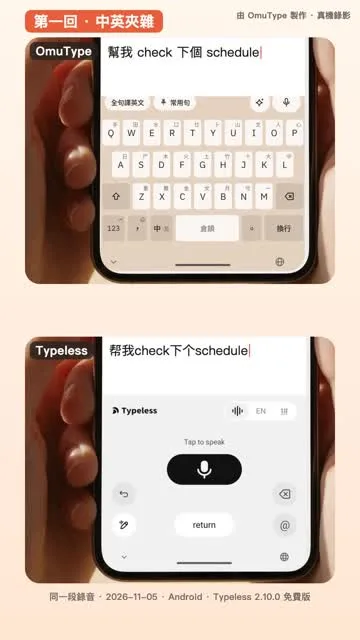
On the sentence that mixes Chinese and English, it typed Simplified Chinese; OmuType always types Hong Kong Traditional
Set up in three steps, in a minute
iPhone questions
How do I start voice on an iPhone?
Tap the mic above the keys. OmuType opens for a moment to start listening, then back to the app you were typing in
How is it different from Apple's Dictation?
Chinese mixed with English, names and brands (your Keywords) all come out right, Cantonese stays written as Cantonese, and it never types Simplified Chinese
Can I type whole sentences in Quick and Cangjie?
Yes: a whole sentence in one run, English mixed in, and it still guesses right with a few keys wrong
I bought VIP on Android. Does it work on my iPhone?
Yes. Enter the Android phone's device code on the iPhone, and the two phones share one weekly allowance of voice time
Is a third-party keyboard safe?
Typing is processed on the phone, with no ads and no selling of data. Password fields always use Apple's own keyboard